Sample plan drawn for this page with Storyrod's length marks. Real captures from the app are on sheets A2 to A5.
Walk the room. Leave with the plan, the takeoff and the bid.
Storyrod draws each room as you measure it, works out the drywall, paint, flooring and trim, prices them at your rates and exports a PDF with your logo on it.
Where each length came from
Tap a mark to see its walls. The ≈ and ~ walls are the ones to tape before you order.
Free through Apple's TestFlight app. iPhone and iPad, iOS 26.5 or later. Your first 3 jobs are free, and there's no subscription.
- Project
- Sample plan, this page
- Sheet
- A1·Plan
- Scale
- Not to scale
- Status
- Public beta
Verify Lengths
Capture first, then tape what mattersCapture the room any of three ways, then let Storyrod tell you which walls are worth a tape.
- Scan Room uses LiDAR on iPhone Pro and iPad Pro. Walls, doors and windows come in on their own. Tap Scan Next Room to carry on into the next room in the same scan, so the rooms line up in one plan.
- Measure With the Camera works on other iPhones: tap each floor corner, set the ceiling height, then mark doors and windows.
- Sketch by Hand works anywhere: draw the walls and type the lengths, or type a room's width and length and get its four walls.
- Verify Lengths lists the walls you haven't checked yet, the least certain first, with a box for the taped value. Type it in and the wall prints bold as measured.
Takeoff
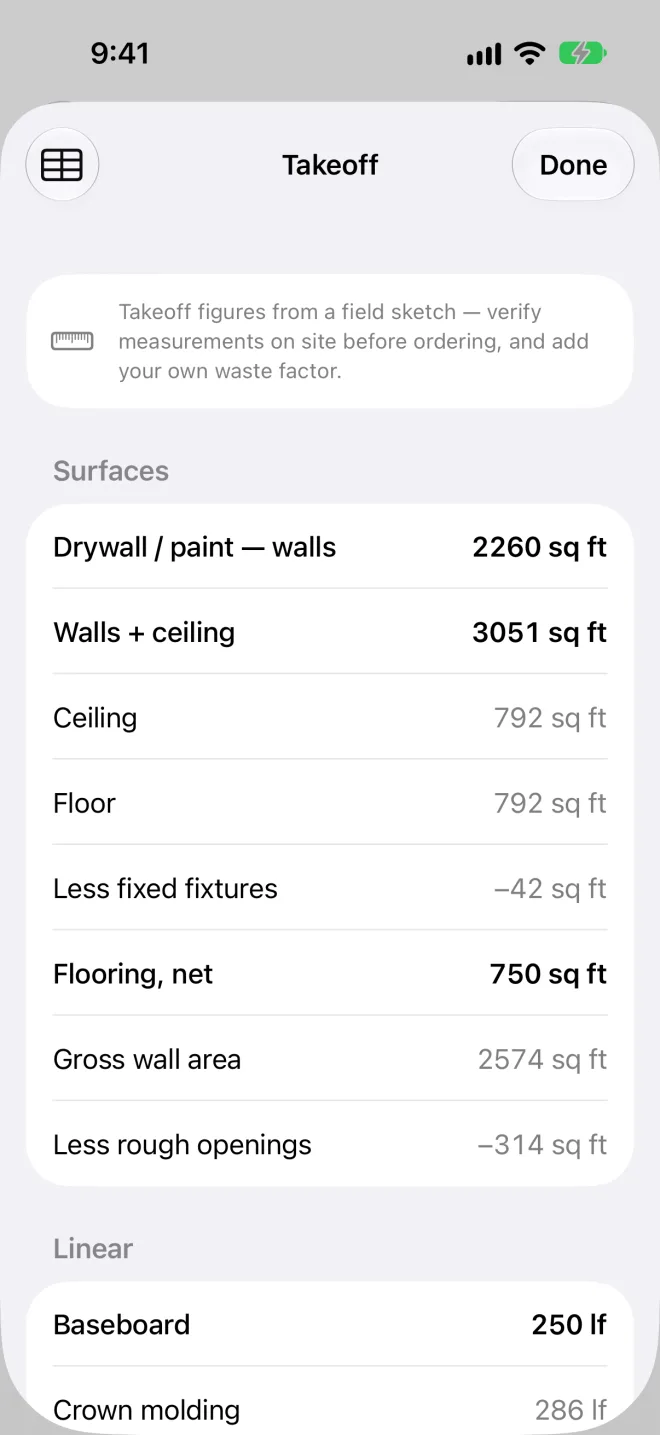
Recomputed on every editQuantities by room and in total, with rough openings already taken out. Add your own waste factor.
| Item | Quantity |
|---|---|
| Surfaces | |
| Drywall / paint, walls | 2260 sq ft |
| Walls + ceiling | 3051 sq ft |
| Floor | 792 sq ft |
| Less fixed fixtures | −42 sq ft |
| Flooring, net | 750 sq ft |
| Less rough openings | −314 sq ft |
| Linear | |
| Baseboard | 250 lf |
| Crown molding | 286 lf |
| Door & window casing | 252 lf |
- Flooring comes out net of cabinets, counters, tubs and stairs, with the gross floor area kept.
- Ceiling height per room. A room can have its own; its wall area and crown follow it.
- Placement marks for outlets, switches, lights, panels, water heaters, floor drains, registers, thermostats and smoke detectors. Put them where they are or will go, and the takeoff counts them by room. They're marks, not circuit, load or sizing calculations.
- Export CSV: one row per room and a total, for your own spreadsheet.
Estimate
Priced at your rates, never oursEnter your rates once in Default Rates. Each takeoff line is priced from them, material and labour kept separate.
| Line | Comes from |
|---|---|
| Quantities | The takeoff, for every room in the job |
| Material and labour rates | Your Default Rates. Storyrod ships with no prices |
| Your own lines | Add or remove any line by hand |
| Markup and Discount | Set per estimate; the discount comes off before tax |
| Terms | Your payment terms, printed above the signature lines |
Client Copy
For the homeowner to sign: the priced lines, your terms and signature lines.
My Copy
For you: the same estimate with your margin shown.
Export
PDF, DXF and print, from one drawing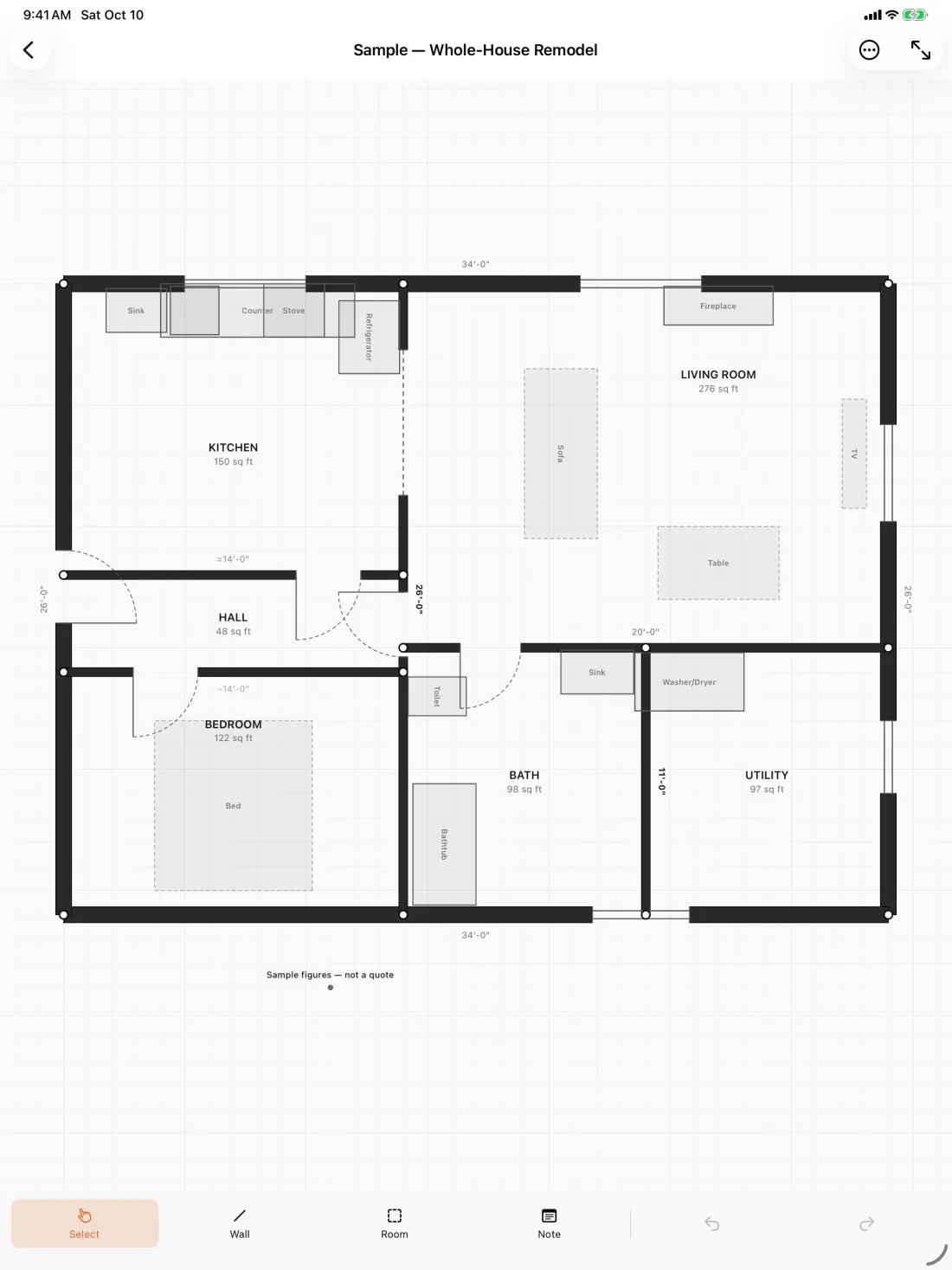
- Export PDF: a dimensioned plan in landscape on Letter, Legal, 11×17, A4 or A3, with your logo and title block, the room schedule, the takeoff and the legend of where each length came from. A house with more than one level gets a sheet per level.
- Photos pinned to the plan. Take a photo or pick one and pin it where it was taken. The PDF prints each photo on a page numbered to match its pin.
- Export DXF for the architect, on standard AIA layers:
- A-WALL
- A-DOOR
- A-GLAZ
- A-FLOR-FIXT
- A-ANNO-DIMS
- A-ANNO-NOTE
- E-POWR
- E-LITE
- P-FIXT
- M-HVAC
- E-FIRE
- Print Plan, Print Client Copy, Print My Copy over AirPrint.
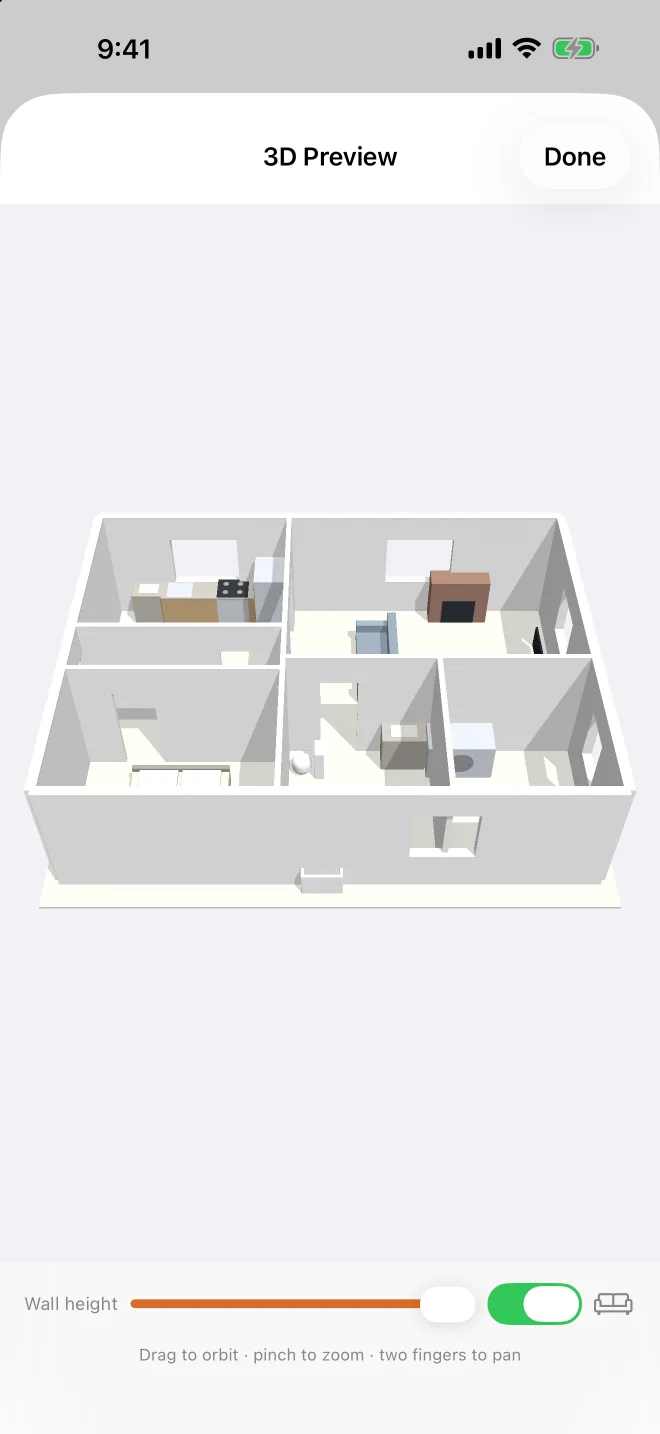
- 3D Preview to walk the homeowner through the room: orbit, pinch and pan.
General notes
Read before you bidJobs
Your first 3 jobs are free. After that, buy jobs in the app, 1, 5 or 25 at a time. There's no subscription, credits never expire, and one job covers every room in the house.
Started jobs stay open
When you run out of jobs, every job you've already started still opens, edits, re-prices and exports.
Lengths
LiDAR lengths print to the half inch. Camera lengths are estimates, marked ≈ and rounded to the inch. Drawn walls are marked ~. Every sheet Storyrod prints says to verify before ordering.
Devices
iPhone and iPad with iOS 26.5 or later. LiDAR scanning needs an iPhone Pro or iPad Pro; every other model measures with the camera or by hand.
Your plans stay on your device
No account needed. Sign in with Apple only if you want bought jobs to follow you to a new phone. To move a job to your iPad, send it with AirDrop, Mail or Files.
Prices are yours
Storyrod doesn't come with material prices or regional costs. It prices from the rates you enter.
Field sketch·dimensions approximate·verify all conditions before ordering or fabrication
Join the TestFlight beta